In the new Unity for GameObjects netcode, there’s no way to control the spawn position directly via the NetworkManager. The simplest way I found was to write a “SpawnManager” with a list of possible spawn positions, and it spawns the prefabs after OnClientConnected.
using UnityEngine;
using Unity.Netcode;
using System.Collections.Generic;

public class SpawnManager : MonoBehaviour
{
 public static SpawnManager Instance;
 [Header("Player Prefab")]
 [SerializeField] private NetworkObject playerPrefab;
 [Header("Spawn Points")]
 [SerializeField] private List<Transform> spawnPoints;
 private int spawnIndex;

private void Awake()
 {
 Instance = this;
 }

private void Start()
 {
 NetworkManager.Singleton.OnClientConnectedCallback += OnClientConnected;
 }

private Transform GetNextSpawnPoint()
 {
 var spawn = spawnPoints[spawnIndex];
 spawnIndex = (spawnIndex + 1) % spawnPoints.Count;
 return spawn;
 }

private void OnClientConnected(ulong clientId)
 {
 if (!NetworkManager.Singleton.IsServer)
 {
 return;
 }
 Transform spawn = GetNextSpawnPoint();
 NetworkManager.Singleton.SpawnManager.InstantiateAndSpawn(
 playerPrefab,
 clientId,
 destroyWithScene: true,
 isPlayerObject: true,
 forceOverride: false,
 position: spawn.position,
 rotation: spawn.rotation
 );
 }
}
Create a GameObject called SpawnManager, give it this script and then drag the prefab and the spawnpositions into its variables: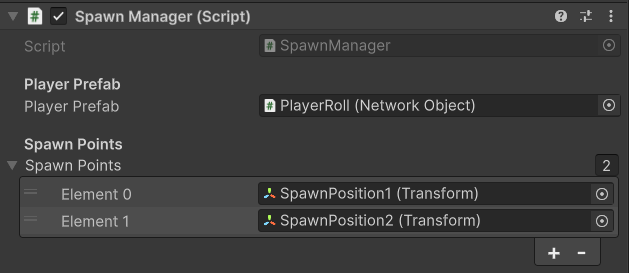
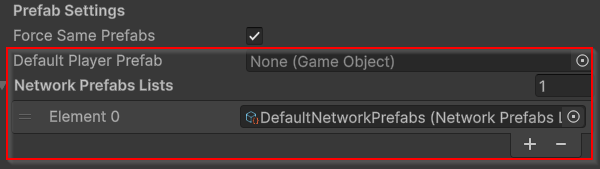
Make sure that in the NetworkManager, the network prefabs list is not empty. The default player prefab however is, because the SpawnManager spawns the prefabs: